Setup nf-core/proteinfold on Setonix
Overview
Teaching: 5 min
Exercises: 5 minQuestions
Objectives
Locate the resources available to support running AlphaFold2 on Setonix.
Prepare a Nextflow configuration file to utilise available resources.
Setup
-
Before commencing the exercise, navigate to the relevant working directory:
cd $MYSCRATCH/2025-ABACBS-workshop/exercises/exercise2/ ls -
You should see the following files which will be used in this exercise:
abacbs_profile.config examples fasta samplesheet.csv
nf-core/proteinfold
proteinfold is a Nextflow pipeline designed to support numerous models for molecular structure prediction.
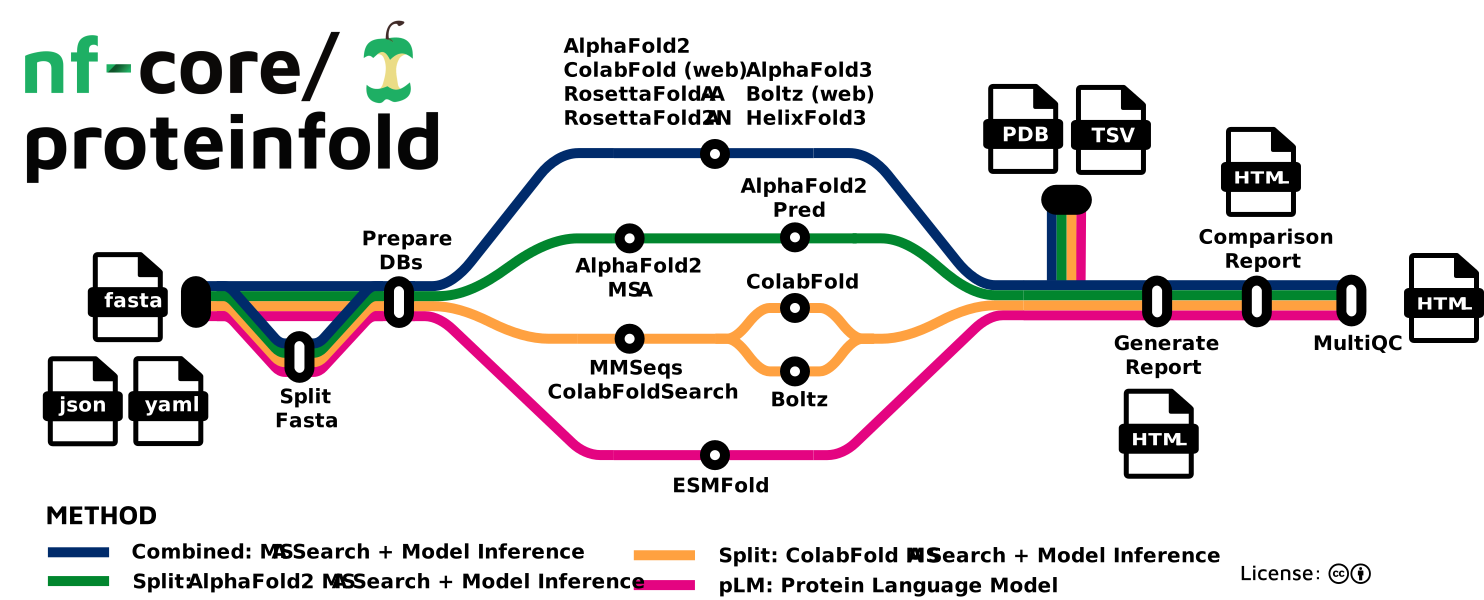
Today, we will use proteinfold to predict the structure of our uncharacterised protein using the AlphaFold2 model.
We will use a development branch (commit: 53a1008) to access some of the latest features that are not yet available in the current release.
-
Load a specific nextflow version, and pull the required proteinfold commit:
module load nextflow/25.04.6 nextflow pull nf-core/proteinfold -r 53a1008 -
View the directory tree:
tree $NXF_HOME/assets/nf-core/proteinfold/ -L 2 --filelimit=20
Result
├── assets
│   ├── adaptivecard.json
│   ├── comparison_template.html
│   ├── dummy_db
│   ├── dummy_db_dir
│   ├── email_template.html
│   ├── email_template.txt
│   ├── methods_description_template.yml
│   ├── multiqc_config.yml
│   ├── nf-core-proteinfold_logo_light.png
│   ├── NO_FILE
│   ├── NO_FILE_PAE
│   ├── report_template.html
│   ├── samplesheet.csv
│   ├── schema_input.json
│   ├── sendmail_template.txt
│   └── slackreport.json
├── bin
│   ├── extract_metrics.py
│   ├── fasta_to_alphafold3_json.py
│   ├── fix_obsolete.py
│   ├── generate_comparison_report.py
│   ├── generate_report.py
│   ├── mmcif_to_pdb.py
│   ├── msa_manager.py
│   ├── __pycache__
│   └── utils.py
├── CHANGELOG.md
├── CITATIONS.md
├── CODE_OF_CONDUCT.md
├── conf [32 entries exceeds filelimit, not opening dir]
├── docs
│   ├── images
│   ├── output.md
│   ├── README.md
│   └── usage.md
├── LICENSE
├── main.nf
├── modules
│   ├── local
│   └── nf-core
├── modules.json
├── nextflow.config
├── nextflow_schema.json
├── nf-test.config
├── README.md
├── ro-crate-metadata.json
├── subworkflows
│   ├── local
│   └── nf-core
├── tests
│   ├── alphafold2_download.nf.test
│   ├── alphafold2_download.nf.test.snap
│   ├── alphafold2_split.nf.test
│   ├── alphafold2_split.nf.test.snap
│   ├── alphafold3.nf.test
│   ├── alphafold3.nf.test.snap
│   ├── colabfold_download.nf.test
│   ├── colabfold_download.nf.test.snap
│   ├── colabfold_local.nf.test
│   ├── colabfold_local.nf.test.snap
│   ├── colabfold_webserver.nf.test
│   ├── colabfold_webserver.nf.test.snap
│   ├── default.nf.test
│   ├── default.nf.test.snap
│   ├── esmfold.nf.test
│   ├── esmfold.nf.test.snap
│   ├── nextflow.config
│   ├── split_fasta.nf.test
│   └── split_fasta.nf.test.snap
├── tower.yml
└── workflows
    ├── alphafold2.nf
    ├── alphafold3.nf
    ├── boltz.nf
    ├── colabfold.nf
    ├── esmfold.nf
    ├── helixfold3.nf
    └── rosettafold_all_atom.nf
Setup environment
Containers are one of the most effective ways to manage software in workflow development, especially with Nextflow.
Background: Why containers?
A container is a lightweight, portable environment that bundles an application together with everything it needs to run such as libraries, dependencies, and system tools. It is a simple and reliable alternative to installing software directly on your system or HPC environment (which often requires managing dependencies manually). On HPC systems, this means isolation from other environments, reproducibility across platforms, and simplified maintenance without manual installs or dependency troubleshooting.
It is recommended to pull containers from trusted sources like BioContainers, quay.io or Seqera. During execution, Nextflow automatically pulls required images, often from these repositories, and stores them in the work directory.
In this exercise, we will be using Singularity containers.
-
Load the corresponding module on Setonix.
module load singularity/3.11.4-nompi - Before executing the workflow, we will define a number of environment variables. These variables tell Nextflow and Singularity where to find and store container images so you don’t waste time and space downloading them repeatedly.
- These environment variables need to be set each time you log in to the HPC system, or
- Include them in your job submission script before running Nextflow.
mkdir $MYSCRATCH/containers export SINGULARITY_CACHEDIR=$MYSCRATCH/containers export SINGULARITY_LIBRARYDIR=/scratch/references/abacbs2025/containers export NXF_SINGULARITY_CACHEDIR=$MYSCRATCH/containers export NXF_SINGULARITY_LIBRARYDIR=/scratch/references/abacbs2025/containers -
Confirm that several images are visible to Nextflow by:
ls $NXF_SINGULARITY_LIBRARYDIROutput:
 alphafold2_pred-single.sif
 alphafold2-single.sif
 community-cr-prod.seqera.io-docker-registry-v2-blobs-sha256-24-241f0746484727a3633f544c3747bfb77932e1c8c252e769640bd163232d9112-data.img
 community-cr-prod.seqera.io-docker-registry-v2-blobs-sha256-ef-eff0eafe78d5f3b65a6639265a16b89fdca88d06d18894f90fcdb50142004329-data.img
 depot.galaxyproject.org-singularity-multiqc-1.27--pyhdfd78af_0.img
 depot.galaxyproject.org-singularity-multiqc-1.29--pyhdfd78af_0.img
 depot.galaxyproject.org-singularity-python-3.8.3.img
 quay.io-nf-core-proteinfold_alphafold2_msa-dev.img
If you execute a Nextflow workflow that requires a container that is not located in the shared $NXF_SINGULARITY_LIBRARYDIR, the pipeline will attempt to pull the container from a hosted repository and store the image in your personal $NXF_SINGULARITY_CACHEDIR.
Background: Why Environment Variables?
When using containers on HPC systems, Nextflow needs to know where to store and retrieve container images. By default, it downloads containers into the workflow’s
work/directory, which can be inefficient and waste storage if you run multiple workflows.Setting environment variables allows you to:
- Cache container images in a shared location → Avoid repeated downloads and speed up execution.
- Control storage paths → Prevent filling up your home directory or job scratch space.
- Ensure reproducibility → Use the same cached image across multiple runs and workflows.
AMD-compatible images
- The proteinfold workflow includes several modules that are executed on the GPU.
- Default containers hosted by the nf-core organisation support NVIDIA hardware and will not run on the Setonix AMD GPUs.
- Pawsey provides a number of AMD-compatible containers which can be used to run structure prediction models.
- Pre-built images have been provided for the workshop today at
/scratch/references/abacbs2025/containers. - We can configure the workflow to use these non-standard images by defining their path in a custom Nextflow config.
Note
- Normally AlphaFold2 runs 5 different models and picks the best result.
- Today we are using a modified version of AlphaFold2 (
alphafold2-single.sif) that only runs a single model to reduce execution time.
-
Check the
abacbs_workshop.configfile to confirm that the workflow modules are configured to use non-standard images available on Setonix:grep -w RUN_ALPHAFOLD2 abacbs_profile.config -A3Output:
 withName: 'RUN_ALPHAFOLD2' {
     container = '/scratch/references/abacbs2025/containers/alphafold2-single.sif'
     time = { 12.h }
 }
Reference data
Recall that structure prediction relies on collecting homologous proteins in a multiple sequence alignment (MSA) to identify coevolutionary information.
These homologs are identified from enormous reference sequence databases (>1TB).
-
Check that these databases are available on Setonix:
tree /scratch/references/abacbs2025/databases/ -L 1 -
You should see that the required AlphaFold2 databases and model parameters are available here:
 databases/
     ├── mgnify
     ├── pdb70
     ├── pdb_mmcif
     ├── pdb_seqres
     ├── small_bfd
     ├── uniprot
     └── uniref90
Note
- Today, we are using miniature versions of the databases to reduce execution time for the purpose of the workshop.
- These databases will NOT generate high-quality predictions for other protein targets.
- Full size databases are available at
/scratch/references/alphafold_feb2024/databases/.
Key Points
Software designed for GPU execution is often compiled for NVIDIA GPUs.
Custom images can be built to support execution using AMD GPUs.
Container images (i.e. Singularity) can be cached in a shared directory to avoid duplication and speed up workflows.